Showing posts with label Form. Show all posts

Tuesday, 24 October 2017

Jost Hochuli: In Conversation


Jost Hochuli
Jost Hochuli, the renowned book designer, graphic designer, typographer, printer and author of Designing Books, and Detail in Typography has had a slow but steady impact on modern book design and typography. First, through his work, especially that for VGS and Typotron; then through his teaching at the Schüle für Gestaltung in St. Gallen; and more widely through his publications on typography and book design.

Through these books, especially the English language edition of Designing Books, he has become probably the most influential theorist of book design since Jan Tschichold.

Jost’s belief is that book design is not just concerned with beautiful objects, but rather it is about making useful tools for reading.

Apprenticed to Rudolf Hostettler at Zollikofer Verlag (publishing company) in the 1950’s, anecdotally only two typefaces were permitted in the works – Akzidenz Grotesk and Times New Roman. Working in the modernist style known as Swiss or International school, the goal of the apprentice typographer was to simplify page design and layout so that there was no typographic ‘noise’.

Although we think of the Swiss school as being the dominant style in Europe in the fifties and sixties, in fact it was largely confined to Holland, Germany and the German-speaking part of Switzerland. Even within Switzerland, designers in the French-speaking cantons looked to France and Didot, designers in the Italian-speaking cantons to Milan and Bodoni.

Nevertheless, the Swiss school, following the path laid down by the Bauhaus architect, industrial designer and typographer Max Bill won worldwide recognition in the decades following the Second World War

“We were simply louder” said Hochuli.

Bill urged Swiss designers to follow modernist “‘asymmetric’ or organically formed typography”, to reject “the conventional text-image of axial symmetry”.

In response, contemporary designer Jan Tschichold defended the need to design some books “in the manner of traditional typography” while allowing that others might be more suitable done in Bill’s ‘functional’ typography.


As Hochuli developed his style, he was influenced by Tschichold’s plea for “the right to work in the way that I find best”, whether ‘newly revived traditional typography’ or ‘functional typography’.

Although Tschichold never visited the Zollikofer works, Hostettler considering him “A traitor to modernism”, Hochuli followed a middle path between the modernism of the Bauhaus and die neue typographie and traditional book design, before ultimately rejecting the rigidity of the grid.


Preferring to use consistent channels of white space between elements to create harmony on the page, Hochuli’s graphic design practice aimed to capture the feeling of the work through typographic layout that created “adventures on a page”.

Thus echoing the principle ‘form follows function’, Hochuli’s preference is for content to come before design, although, as Hochuli has reiterated on several occasions, the designer must not follow dogma.

--

Jost Hochuli was in conversation with Tony Pritchard, LCC senior lecturer and ISTD board member.

In association with International Society of Typographic Designers, London College of Communication, Presence Switzerland and the Swiss Cultural Fund.


Thursday, 13 October 2016

Noto

Photo: Andy Dunn
Noto, Google’s multi-language font family from Monotype is designed to work over a wide range of different languages and on any device.
 

Noto covers more than 800 languages and 100 written scripts, and includes serif and sans serif fonts across eight weights as well as numbers, emoji, symbols, and musical notation.
 

The result of a five-year collaboration between Google and Monotype, one of the main aims for the typeface is to allow cultures to communicate digitally and help enable global communications across borders, languages and cultures.
 

Monotype has researched and digitally designed the characters, writing systems and alphabets for each Noto typeface, applying the rules and idiosyncrasies for individual languages to the fonts, based on the Unicode standard – a character coding system that defines the characters and languages that can be displayed and used within a computer system.
 

Because new scripts are constantly being added to Unicode, when a computer is unable to display a character in a font, it displays blank boxes instead. These are colloquially known as “tofu”. The name Noto is taken from Google’s goal of having “no more tofu”.

Monotype linguistic typographer Kamal Mansour says: “The aim of the Noto project is to provide digital representation to all the scripts in the Unicode Standard. That in particular is something that many different language communities could not afford to do on their own.”

Sunday, 18 October 2015

In search of the lost logo

It’s not often that I get my name mentioned in the same sentence as two of my design heroes, so thanks to Paul Mellon for posting an update to his search for the (as-yet-unknown) designer of theNeighbourhood Watch logo.


The design neighbourhood really stepped up to support our quest to locate the original designer of the NW roundel. Design journalists such as Lynda Relph-Knight and some of the UK’s pre-eminent designers from the 80’s and 90’s era, such as Mike Dempsey, Studio Dempsey and Michael Johnson, Johnson Banks joined in the search as did ex-employees of the COI in-house design studio, such as Fanny Sigler, Mike Wheeler and Rob Levison who actually put us onto our strongest lead.

Whilst the identity of the original designer remains elusive, Paul goes on to cite Creative Barcode as a method of identifying the originator of creative works that goes beyond simple copyright watermarks.

In the same way that map makers use ‘paper villages’ to identify when their work has been plagiarised, Creative Barcode is a way for creators, entrepreneurs, innovators and brand owners to use Intellectual Property (IP) tags to protect their ideas, concepts and designs.

Part of the value inherent in the value of a brand is its original instance, its history and and subsequent design journey.

By ensuring a design history is maintained, Creative Barcode records, authenticates, time-stamps and IP tags iterations of a design and its creative expression.


The designer should therefore always be identifiable and credited in the Creative Barcode time-line.

So whilst it has become easier for creatives to promote their work by putting their portfolios online, being able to timestamp work and identify yourself as the creator is increasingly important in an industry where ideas are the main currency and it is easier than ever to ‘borrow’ other designers work for creative inspiration.


Wednesday, 13 May 2015

Google Mobile App UX Principles

I do like a good UX framework, and Google’sMobile App UX Principles document uses practical examples to demonstrate how to improve the user experience of apps. The effectiveness of user optimisation strategies are illustrated using metrics such as app performance and user conversion on both Android and iOS platforms.

Adopt, Use, Transact, Return
In designing an app, you need to work hard to meet the expectations of users who are becoming accustomed to high quality apps that deliver usable, robust, and sometimes delightful user experiences.

Investing time and effort in creating, testing and optimising services can have a significant effect on how ‘sticky’ your app becomes.

The basics that need to addressed include optimising conversion, and avoiding interrupting users, or forcing them to think about things that should be simple. Google expresses this as a four-stage ‘Adopt, Use, Transact, Return’ framework.

Adopt, Use, Transact, Return

Adopt - Remove roadblocks to usage  
Remove all roadblocks to usage - and adoption - of your mobile app. Get users into the content / substance as quickly as possible, so that they can use, assess and experience its value to them.

First impressions count, and a splash screen gives you a short but vital window to engage a user in your proposition. But, never make users wait.

Tips / help or an onboarding sequence should only be employed if really necessary - so as not to interrupt users - but when used appropriately at key decision points, tips/help can guide the user in their initial experience and adoption.

Use - Make conversion decisions simple  
Enable people to use your app in the way that suits their needs. A clear structure combined with an excellent search facility using a range of methods, from keyword to product scanning and image search, will help users find what they want quickly and easily, satisfy their needs and drive conversion.

Transact - Provide the ultimate in convenience
Help users progress through each checkout stage with minimal effort, and with sufficient reassurance, to convert without hesitation.

Return - Self service, engagement and delight
Be useful, to engage and delight, in order to retain customers or encourage member loyalty. Because, mobile apps are the most appropriate touchpoint for repeat interactions and frequent transactions, customers and members already loyal to a brand, and mobile first use cases (that couldn’t exist without unique smartphone services leveraging rich and contextual data; etc.), are more likely to return if an app provides an engaging experience.


What not to do


Do not mimic UI elements from other Platforms 
Design for each native mobile platform – Android and iOS - because each has unique capabilities and visual languages

Do not use underlined links 
Avoid using text with underlined links, which are part of the web / browser / page model, and not part of the app / screen model. Apps use buttons, not links.

Do not take users to the browser
Keep users in-app at all times, to maintain their spatial geography and to optimise conversion.

Do not ask users to rate your app too soon after downloading it
Avoid interrupting users by asking them to rate your app if they’ve only recently downloaded it or only used it a few times. Instead, wait until they prove to be repeat users and they’ll be more likely to rate your app favourably and provide more informed feedback

Friday, 17 October 2014

Colour management

And so to Fedrigoni Paper on Clarkenwell Road to attend a presentation on colour management by designer Andy Brown and colour consultant Paul Sherfield of the Missing Horse Consultancy

The Print Handbook
Andy is the author of The Print Handbook, a pocket guide to help designers get the best from their print projects, and I’d met Paul a couple of years ago when he was contracted by COI to help improve our studio colour management.

As the responsibility of pre-press has shifted from printers to the design studio, creatives find themselves required to colour manage their open or PDFX output files, but have little idea of how to work within a structured colour-managed environment. Paul’s mission is to help designers improve their pre-press workflow by explaining the benefits of colour management policy, where it is needed and how it is applied.

Colour management provides a unified environment for handling colours, where a common colour reference is used at each step of production, from photography through design, plate making and printing.

It aims to unify the image throughout the entire production process by using the profiles of the various devices to manage colours.

Comparison of some RGB and CMYK colour gamuts
Basically, you have two colour gamuts, RGB for optical devices and CMYK for output devices. RGB has a wider gamut, whilst CMYK ‘clips’ the available colours into a space that can be rendered by an output device.

However, neither is an absolute – both RGB and CMYK gamuts are device dependent, so the space you work in depends entirely on the input device and the intended output device.

Problems of colour perception also arise because the designer is looking at a monitor that generates colour in RGB, a local colour proof is typically produced in CMYK on an inkjet printer (which deposits ink on the surface of the paper), whilst the commercial printing process (which is also working in CMYK) presses ink into the substrate. (Printed material reflects light, so colors also look different depending on the lighting environment!).

To achieve the best colour fidelity, you therefore need to align your input, editing and output devices, from camera through to press, so they are all working in a common colourspace (independent of any device) so that the various colours can match as closely as possible. This is the basic principle of colour management.

Translation between devices is achieved using International Colour Consortium (ICC) profiles. Based on Apple’s ColorSync engine, ICC profiles are the accepted means of maintaining the consistency of colour files when transporting them between the originator/creator, publisher and printer.

The ICC profiles manage colour between different devices, ensuring that the correct rendering intent is maintained.

The standard rendering intent for printing in North America and Europe is the Relative Colorimetric method. This compares the extreme highlight of the source colourspace to that of the destination colourspace, and shifts all colours accordingly. Out-of-gamut colours are shifted to the closest reproducible colour in the destination colourspace.

So how do you go about setting up a colour-managed environment?

Working backwards from your commercial printer, find out what colour profile your printer is using for the intended press and paper stock, and ask how they would prefer your open or PDFX files set up.

Outputting to a PDFX format retains your embedded colour profile so that your printer knows the colour intent.

For example, in the UK most printers working to ISO 12647/2 will use Adobes ‘Coated FOGRA39 (ISO 12647-2-2004)’ profile which is in the later versions of Adobe CS and used by their colour settings file ‘Europe Prepress 3’. Colour profiles created in this way will prove to be repeatable and maintain their colour fidelity for both litho and digital presses - and are therefore preferable to custom profiles.

Your local proofing device should be set up to use the same profile.

In Adobe Bridge, set your CS colour settings to ‘Europe Prepress 3’.

Calibrate your monitor into the same working space – although note that as monitors warm up, the perceptual colour will change slightly, so for colour-critical work, monitors should be re-calibrated at regular intervals.

Finally, ensure that all images have an ICC profile embedded – if not, then a generic RGB colourspace, such as sRGB or Adobe RGB (1988), will be assigned when the file is first opened or imported. (If you open a document embedded with a colour profile that doesn’t match the working space profile, in most cases, the best option is to preserve the embedded profile because it provides consistent colour management.)

sRGB is recommended when you prepare images for the web, because it defines the colour space of the standard monitor used to view images on the web.

Adobe RGB is recommended when you prepare documents for print, because the Adobe RGB gamut includes some printable colours (cyans and blues in particular) that can’t be defined using sRGB.

So having aligned the colour profiles of all the devices in your workflow, you can design in in a colour-controlled environment, knowing that what you see really is what you’re going to get.

Monday, 22 September 2014

Big design

gov.uk
When the award-winning gov.uk site launched in 2012, it marked the moment ‘big design’ entered the mainstream.

Driven partly by the need to be accessible, and partly by the requirement to work on mobile devices, the launch of gov.uk also coincided with the design industry moving from skeuomorphic design towards the flat aesthetic seen in Microsoft’s Windows 8 ‘Metro’ interface, Apples iOS8 and Google’s Materials Design.

This combination of HTML5 dynamic backgrounds, overlayed with large type and control icons on flat colour panels has created a youthful ‘flat’ UI design meme that references the Bauhaus and Swiss Design schools and provides a single underlying system providing a unified experience across platforms and device sizes.

The new BBC responsive website, now in beta testing, follows the same principles.


BBC Beta

Every week, the BBC News website gets around 115 million visits, and the number coming from mobiles and tablets is increasing all the time to the point that these devices now account for 43% of unique browsers.

Looking at device usage, it seems clear that the increased take up of tablet and mobile devices, with their requirement for larger button target areas, is driving the move towards ‘big design’.


Apple iOS7
For any organisation, maintaining different versions of websites for desktop, tablet and mobile (as well as accounting for different screen sizes, different browsers and legacy systems) is unsustainable. Designing simpler responsive sites, optimised for different screen sizes, is the most efficient structure, but it means that control areas designed for display on mobile devices take up a proportionally larger area of screen when displayed on a desktop device.


Microsoft Metro/Windows8
Google Material Design
This also represents a shift in the way websites are designed. In the early days of the web, websites were merely ‘brochureware’ extensions of printed publications. (The first web page I designed for the DTI just had a telephone number on it.) Then came sites that replicated the (sometimes labyrinthine) internal structure of an organisation. In the third wave these sites were turned around to be more user-centric.

Now we are seeing the rise of more focused task-centric sites, and enabling users to carry out these tasks (often on the move) using a simple graphic UI that stands out from the background visual noise is a major driver in big design.

But in deploying large blocks within your content, the challenge now for a designer is how to develop the visual structure without losing a sense of style.

The resolution of mobile screens means that good typography, tracked and spaced with as much precision as print, is now achievable. Icons and other UI elements don’t need candy stripes or glossy reflections to make them look better at low resolutions.

So while it’s good to know what best-practice is, it’s possible for designers to push the boundaries, because we can.


Friday, 15 August 2014

In These Stones Horizons Sing

Continuing the theme of a visual language being structured by an overarching idea, graphic design can learn a lot from looking at architecture.

Wales Millennium Centre
The Wales Millennium Centre was designed and built in Wales. The brief to the architects, Percy Thomas, was that it had to be unmistakably Welsh and internationally outstanding.

Wales’ identity is conveyed through the materials used to build the Centre. They connect to Wales’ culture, landscape, and history.


The exterior walls are clad in horizontal layers of welsh slate, inspired by the architects’ memories of the stratified cliffs along Wales’ Glamorgan coastline around Ogmore and Southerndown.

This visual language ties the building to the Welsh landscape, and the structure of the fascia and colonnades also echoes the tunnels and galleries of the mines that once dominated Welsh industry.

You can see the clear line of thought that developed from the architect’s sketch books through the design drawings to the finished building. The success of translating the architects vision into a structure with a coherent visual language has produced a powerful statement of Welsh identity.

Thursday, 17 April 2014

Heartbleed

It's a simple logo for a complex bug. But creating an identity to raise awareness is entirely the point.

You’ve probably never heard of CVE-2014-0160. But you probably have heard of the Heartbleed bug, the security hole in some implementations of the OpenSSL protocol that provides secure communication between servers.

The two are one and the same, except that CVE-2014-0160 is the name assigned under the Standard for Information Security Vulnerability Names protocol, wheras Heartbleed is a catchy, scary name with a catchy, scary logo depicting a red heart. Bleeding.

The power of the Heartbleed logo is in its sheer, bold literalness, and in that regard it’s perfect for its purpose.

Heartbleed was given its identity by the international security company Codenomicon, which independently discovered the CVE-2014-0160 OpenSSL exploit on the same day as Google researcher Neel Mehta.

Most security holes like CVE-2014-0160 would be posted on messageboards read only by the coding and hacking community, but in this case Heartbleed was so serious that everyone who uses OpenSSL in applications such as web, email and instant messaging was at potential risk of having their passwords compromised.

A Codenomicon engineer came up with the name Heartbleed, inspired by a tangentially related piece of software called Heartbeat, and in a brilliantly inspired piece of marketing, Codenomicon registered Heartbleed.com, designed an FAQ explaining the bug, and accompanied it with a logo by Codenomicon designer Leena Snidate.

The logo went viral and the Heartbleed brand was born.

Don’t be surprised if the next major bug also gets its own name and logo™ and probably a clothing range.

Monday, 24 March 2014

A structured identity for the Brecon Beacons


The Brecon Beacons is an area famed for its exceptional natural beauty, wide open hillsides and natural light. It is also designated as a ‘dark sky’ area with little or no light pollution.

In 2010 Visit Wales designated the Brecon Beacons as a national park, and Small Back Room were asked to create a new brand for the Brecon Beacons, basing the designs around the ideas of light and the thought ‘Our National Park’.

Taking the idea of light as central to the branding, the logo contains two intersecting lines that create a triangle or cone of light, which creates an underlying structure that influences the visual language of the brand. For example, the cone can be used as a supergraphic.

I like the idea of supergraphics that stem from the core brand. I first became aware of this when working with the Department of Health (DH) brand, where a segment of the DH arc is used as a container for images.

But supergraphics are not limited to print.

Taken to an extreme, the shard-like visual language developed by FutureBrand from the construction lines for the 2012 London Olympic logo, were used to create environmental graphics that could be expressed on a huge scale, for example as seating patterns in the Olympic stadium and pool.

You can imagine the same principles being used to influence the environmental design for visitor centres, signage and events like Brecon Jazz.

The Brecon Beacons brand is designed to be bilingual, and the brand colour palette is extended to enable the brand to be used as flexibly as possible.

The website will launch in April, and stakeholders will be able to download digital assets to apply the brand locally. I hope they're able to imagine the possibilities and to use it well.

Tuesday, 5 November 2013

Less than one second


Paul Butt / Section Design
Structuring and visualising data is a discipline that always appeals to me, so it was with a sense of anticipation that I took a trip to Shoreditch to see a two-day exhibiton of information and data design curated by London based information design agency, Signal Noise.

Signal Noise commissioned a series of print-based data visualisations that explored the theme of “less than one second”, based on the premise that time is of the essence now more than ever before.

We now access enormous reams of data in ‘less than a second’, thanks to technologies such as cameras that captures the movement of light in slow motion, or the Large Hadron Collider (LHC) that observes sub-atomic activity happening in millionths of a second.

Technology enables a vast number of data points and events to be read and understood across a variety of fields - from automated trades to F1 analytics - but filtering and making sense of the data so that it provides a useful insight is the job of the information graphic designer.

Despite the wide range of subjects used as source material for the exhibition, including athletics, cinematography, F1, GPS, the LHC and stock trading, I found it significant that the base structure of the majority of the visualisations was circular.


Mapping the data - Josh Gowen
The visualisations that eschewed circles were, I thought, less intuitive and less visually attractive, even though timelines are traditionally depicted as, well, a line.

Imposing a clock face metaphor seemed to provide a familiar ‘carrier’ structure for the message, enabling the viewer to quickly interpret the information.

The most successful visualisation seemed to me to be Josh Gowen’s ‘Mapping the data’, combining the clock metaphor with the shape of the LHC and a graphic that showed how the volume of data crunched by the LHC is filtered and then delivered to 151 research centres worldwide.

Telling the story by combining seven pieces of information in one graphic, plus some cool stats. What's not to like?

Sunday, 27 October 2013

Phonebloks

On Tuesday 29th October the Phonebloks video will ping across social networks 375 million times.

Phonebloks is a new concept for a mobile phone with a replaceable screen and easily moveable, changeable “bloks”, each containing a different element such as battery, chipset, gyroscope and so on that would give users a chance to choose from a range of components, and replace or upgrade them when necessary.

A phone only lasts a couple of years before it breaks or becomes obsolete. Although it’s often just one part that killed it, we throw everything away because it’s almost impossible to repair or upgrade.

The idea, by Dutch designer Dave Hakkens, came about when Hakkens realised that if a device could be taken apart and restructured more easily it would last much longer (and minimise electrical waste).

And so the idea of Phonebloks was born.

Phoneblok is made of detachable bloks. The bloks are connected to the base which locks everything together into a solid phone. If a blok breaks you can easily replace it; if it’s getting old just upgrade.

Bloks can be developed for specific needs. Solar powered batteries, sensitive screen for blind people, lightweight for travelers etc.

“Let’s say this is your phone and you do everything in the cloud - why not replace your storage blok with a bigger battery blok?” says Hakkens. “If you’re like this guy and love to take pictures, why not upgrade your camera?”

The bloks themselves would be available from a ‘Blokstore’, like an app store for hardware. In the store you buy your bloks, read reviews and sell old bloks. Small and big companies develop and sell their bloks. You can buy a pre-assembled phone or assemble it yourself by selecting the brands you want to support. The choice is yours.

And the platform can be adapted into other sizes to create new devices like tablets, cameras etc.

But at the moment, it’s just an idea.

For Phonebloks to happen, it totally depends on companies thinking there is a market for it, so the more people that are interested, the sooner companies start working on it.

Thursday, 19 September 2013

‘I love Comic Sans’


And so to hear Bruno Maag speak at London Design Week’s Sound and Type lecture in the glamorous environs of the Soho Hotel Screening Room.

His opening statement, that he ‘loves Comic Sans’, drew a predictable hiss of outrage from the designers and typographers in audience, but the point Bruno made is that Comic Sans is completely appropriate for its original purpose, comic book style lettering for speech bubbles in the programs MS Bob and MovieMaker

Comic Sans has a characterful letterform that connects, perfect for supporting letter recognition in early learning (and useful for dyslexics too).

So how do you engage audiences visually and emotionally with your brand? What are the essential elements that make your brand unique? How do you create bespoke tools that set your brand apart?

The challenge presented to branding in the global marketplace is maintaining the brand look and feel across all touchpoints in all markets.

Think ‘international’, and designers reach for their tried and trusted sans serifs, but where’s the emotional connection in the international style?

Remember that the ‘modern’ typeface Helvetica was cut in the 1950’s (itself based on the grotesque faces of the late Victorian 1900’s), putting Helvetica well into middle-age.

Instead, make an informed choice of typeface, one that expresses your brand values and connects visually and emotionally with your audience, a typeface that can be placed right at the heart of your brand.

Global companies, such as HP, see investment in a bespoke typeface as a key part of supporting their brand experience worldwide.

But relying on the Western European character set no longer cuts it. Fonts need to accommodate Arabic, Chinese, Cyrillic, Greek, Indian and Thai characters.

Designing a font for the Chinese market means creating 27,500 glyphs alone and can take up to two years.

And that’s before you take into account Hong Kong and Taiwanese Chinese.

Font design is a major investment, but the recognition value that an appropriate font brings to a brand makes it arguably worthwhile.

Just don’t use Comic Sans unless you’re designing a comic.

Wednesday, 17 October 2012

The Big Draw 2012

At the V&A for The Big Draw, I attended one of the seminars given by Heatherwick Studios.

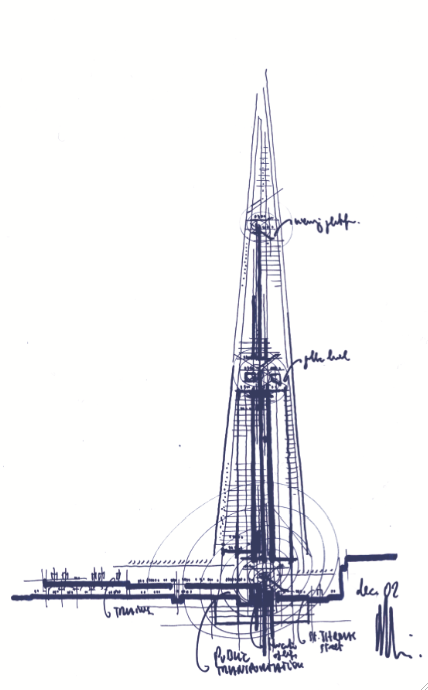
The main theme was about the importance of sketching in order to structure your design thinking.

Guggenheim Bilbao - Frank Gehry
Quick sketches made with your client on site are a great visual shorthand that can be developed later in the studio. The challenge is to keep the energy of those initial sketches as the design goes through various iterations and refinement on drawing boards, computer and CAD systems.

Sketching elevations and floorplans, page layouts or wireframes conveys much information that would be lost if the same information was provided as a narrative. Sketches are easier for both the layman and expert to interpret and so understand the vision of the designer.

East Beach Cafe - Heatherwick Studio

And with the increasing number of competitions and awards that require a story arc, anecdotally, many designers are going back at the end of a project to retrospectively create that all important ‘back of the napkin’ sketch that inspired the project in the first place (with apologies to Renzo Piano).

The Shard - Renzo Piano

Now, where did I put my pencil…

Friday, 16 March 2012

iPhone screen layout

In developing smartphone screen interfaces, the challenge is to fit the core feature set into the vertical screen area. Make the buttons too big and you need to lose some content. Too small and the interface is frustrating to use. But if size matters, how small is too small?

In the case of the iPhone screen (480x320 pixels), the structure of the vertical interface is established using a 44 pixel grid. This establishes the minimum size for a tap target on an iPhone, like a button or a list item, at 44 pixels – about the size of a fingertip touching the screen. By building the standard controls in proportion to that measure, apps can be developed for handheld devices that are actually built for hands, using finger-sized units.

That doesn’t mean that the button graphics have to be 44 pixels high. Instead, whilst a button graphic may be visually smaller, nominally within a 20x20 pixel box, the graphic sits within an active 44 pixel ‘tap area’ that extends beyond the button edges. That way, if touching slightly above and below, or to the left and right of a button, the tap is still registered by the button footprint.


At least one dimension of Apples’ standard controls always fits to this 44 pixel measurement. For example, although the QUERTY keyboard buttons are as narrow as 30 pixels, they still retain the 44 pixel height.

Rows of buttons are then fitted into multiples of 44 pixels. For example, the iPhone home screen organises buttons into rows 88 pixels deep.

Using multiples of 44 provides a natural rhythm in proportion to your fingers and helps establish the look and feel of your interface in harmony with other iPhone apps.

Wednesday, 28 September 2011

The Power of Making

‘Alphabet’, pencil-tip structures, Dalton Ghetti, USA.
Photo by Sloan T. Howard Photography
And so to the Power of Making exhibition at the V&A. Making is the most powerful way that we solve problems, express ideas and shape our world. What and how we make defines who we are, and communicates who we want to be.

For designers, making is a chosen vocation: a way of thinking, inventing and innovating. It’s a delight to be able to shape a material and say ‘I made that’.

I particularly liked the way materials have been juxtaposed so that the soft ‘fur’ of an animal or dress is composed of hard metal, or a robot exoskeleton made of wood.

Every object in this exhibition has been made by adding, subtracting or transforming material, or by combining these processes.

Many people think that craft is a matter of executing a preconceived form or idea, something that already exists in the mind or on paper. Yet making is also an active way of thinking, something which can be carried out with no particular goal in mind. In fact, this is a situation where innovation is very likely to occur.

Even when making is experimental and open-ended, it observes rules and structure. Craft always involves parameters, imposed by materials, tools, scale and the physical body of the maker. Sometimes in making, things go wrong. An unskilled maker, hitting the limits of their ability, might just stop. An expert, though, will find a way through the problem, constantly unfolding new possibilities within the process.

Thursday, 28 April 2011

Wim Crouwel at the Design Museum

If you get the chance, take an afternoon out to visit the Design Museum where the Wim Crouwel retrospective is showing until July.

Regarded as one of the leading designers of the twentieth century, Crouwel embraced modernist principles, producing a wide range of typographic designs that influenced the course of graphic design through the 50s and 60s and continues to have resonance today.

Heavily influenced by the Bauhaus and the modernist design work of Jan Tischold and Josef Muller-Brockmann, Crouwel’s initial work as an exhibition designer gave him a great sense of spatial awareness that he brought to his poster and programme designs, first for the Van Abbe Museum in Eindhoven, and later for the Stedelijk Museum in Amsterdam.

Wim Crouwel's work at the Design Museum
Gifted with a sympathetic museum director who allowed him the freedom to develop a signature look, Crouwel developed a structured grid system which acted as a unique template for the Stedelijk Museum's graphic identity. The logic of his designs distil the subject down to its absolute essence, yet often the poster layouts contain an experimental element or visual pun, playing off the exhibition title or the subject artist's style.

In 1963 Crouwel founded the multi-disciplinary design agency Total Design creating the identity for numerous Dutch companies, working for clients such as IBM, and typeface commissions for Olivetti. He was instrumental in leading a controversial redesign of the dutch telephone book using only lowercase letters - offering major savings on ink and paper - but one which failed to find favour with its audience.

New Alphabet (redrawn)
Whereas his strength lay in designing one-off grid-based posters and wordmarks, primarily supported by easily readable sans serif type, his interest in letterforms as graphic objects led Crouwel to design the radical New Alphabet typeface as a visual experiment. Based on the look of type as seen in emerging computer systems, it appeared almost alien, a cipher script of vertical and horizontal lines. This almost Illegible font challenged the design establishment and provoked debate amongst modernists - a debate which Crouwel was happy to engage in - openly admitting to placing visual aesthetics above function.

(Although never meant to be really used, New Alphabet was subsequently redrawn by Brett Wickens and Peter Saville for the Joy Division album, ‘Substance’ in the late 80s.)

Some of his work has dated, but there are many pieces that still retain a freshness and vitality and demonstrate a clarity of thought. Set beside contemporary work by design groups 8vo, Cartlidge Levine, Studio Myerscough and Peter Saville, the influence and legacy of Wim Crouwel can be clearly seen.

Tuesday, 15 March 2011

Bass notes: Saul Bass at London's Kemistry Gallery

Saul Bass is acknowledged as one of the 20th century’s most successful corporate designers, responsible for (amongst others) the logos and identity systems for AT&T, United Airlines, Alcoa and Warner Communications.

Bass’s work is instantly recognisable for its directness, its simplicity and the way it makes its meaning felt. Breaking all conventions in the 1950s and 60s, Bass virtually invented film titles as we know them today, and he was the first to synthesize movies into compelling trademark images.

Looking at his poster designs on display at the Kemistry Gallery, I wondered how much his style was driven by the silk screen process and the need to reduce the visual idea down to it's simplest, most expressive components.

His later posters were more colourful and visually complex, yet seemed to have less impact.

In a period when graphic imagery can be easily manipulated electronically, Bass reminds us that to cut through the visual clutter, a strong idea is always at the heart of a great design.

Tuesday, 11 January 2011

Perception II (discernment)

In previous posts I looked at some theoretical tools to refine and improve messaging. Among these, some of the more practical ones are chunking, perception, scanpaths, wayfinding and content structure;

In perception, there are two key structures involved, difference and discernment.

Discernment and Gestalt pschology
Adjacent objects are generally perceived and processed as a group and considered to have a like meaning. Objects which share similar attributes – size, colour, shape, direction – are also perceptually grouped together.

Grouping objects to create contextual relationships and create implied alignments helps a designer to guide the viewer’s eye through the content.

These principles of perception are explored in the theories of Gestalt psychology, that examine ‘the essence or shape of form’. The phrase ‘The whole is greater than the sum of the parts’ is often used when explaining Gestalt theory.

Fundamental to Gestalt are the laws of Pragnanz, which state that we tend to order things in a manner that is regular, ordered and symmetric;
  • Principle of closure – the viewer infers elements in order to complete a regular figure
  • Principle of similarity – the viewer groups similar elements together
  • Principle of proximity – spatial proximity induces the viewer to perceive a group
  • Principle of symmetry – symmetrical images are perceived by the viewer as a group even if separated by distance
  • Principle of continuity – The viewer infers continuing patterns
  • Principle of common fate – Elements with the same direction are perceived by the viewer as a group

Gestalt psychology is frequently used in user interface design, for example where text fields and buttons are placed with reference to the laws of similarity and proximity.

Designing familiarity in to layouts through consistent placement of similar types of content creates a rhythm and flow in your designs that allow the viewer to process information quickly and efficiently.

Perception I (difference)

In a previous post, I talked about how designers transmit knowledge, share concepts and process information through language, and how structure and legibility affect the visualisation of messages and inform the design decisions you make on a daily basis.

To help your audience understand your messaging, you need to know how they will receive and decode the information you send.

Scientific study has provided designers with a number of theoretical tools to refine and improve their messages. Among these, some of the more practical tools are chunking, perception, scanpaths, wayfinding and content structure.

In perception, there are two key structures involved, difference and discernment.

Difference threshold and Weber’s Law
Understanding our ability to perceive information and distinguish one information set over another can help designers target their messages for maximum impact.

Weber’s Law of Just Noticeable Differences (no, really!) suggests that there is an identifiable minimum amount of change that can be defined for a viewer so that they are able to notice a difference in any one design

If the amount of perceptual change remains a constant (and can thus be predicted unconsciously by the viewer), then it is easier for your audience to process and distinguish between different types of information. This regular rate of change is known as the ‘difference threshold’.

Weber’s Law can be used to help designers make constructive choices in making information follow an obvious hierarchy.

For example, setting a consistent rule for the differential sizing of type headings, say in 4 point increments, establishes a clear information hierarchy in the mind of the audience.

Similarly, decisions on the relative weights of fonts in typeface design can also be informed by identifying the difference threshold.

User testing of visual assumptions against Weber’s Law can help confirm the designer’s intuition regarding aesthetic considerations and help establish clearer communication with the audience.

Wednesday, 8 December 2010

Evolving English

© British Library
On Tuesday I went to a fascinating lunchtime gallery lecture given by the curators of the Evolving English exhibition at the British Library.

In the course of my visit, what struck me was that no sooner did individuals or institutions try to fix English within a set of rules, so the language evolved as accepted usage changed.

The first part of the exhibition gives an overview of early, middle and then old English, using documents from the permanent collection to chart the development of the language. Whilst the court and state used French, and Latin was the language of the Church, Chaucer’s Canterbury Tales was the first widespread text seen in old English, the language of the people.

The rest of the exhibition is non-chronological, but divided into themed pairs;
  • Written and spoken English
  • Native and foreign English
  • English at work and play

The development of English as world language is bound up in the development of England as a nation, with social class and with the literary, scientific, manufacturing and trading links forged with countries round the world.

The growth of the British Empire helped spread English around the globe, and also enabled it to absorb a vast number of new words from other countries into the language.

Structurally, everyday English continues to develop. Useful words are added whilst unnecessary words quietly fall into disuse. Today, young people mix yardie, east asian and estuary English to create a new street language that is owned by its speakers.

Concerns about the decline in the quality of English usage, never far from the headlines, have been regularly expressed since 1712 when Jonathan Swift proposed an ‘Approved English’ committee along lines of the Academie Francaise. This suggestion has never been taken up officially in Britain, so as a language English has been free to adapt, add, appropriate or coin new words as required – and in doing so has evolved into a dynamic and flexible world language.

It's a tool that too many designers ignore.